 AgentSafe
A smoke detector and a safe for your API keys.
AgentSafe lives in your Mac’s notch. It tells you the moment an AI agent leaves an API key in a transcript, a config file or your shell history, and it keeps your keys behind Touch ID, where agents cannot read them.
Scanning is free. Pay once for the rest. macOS 14 or later. No account, no cloud.
Agent transcripts are the new .env file.
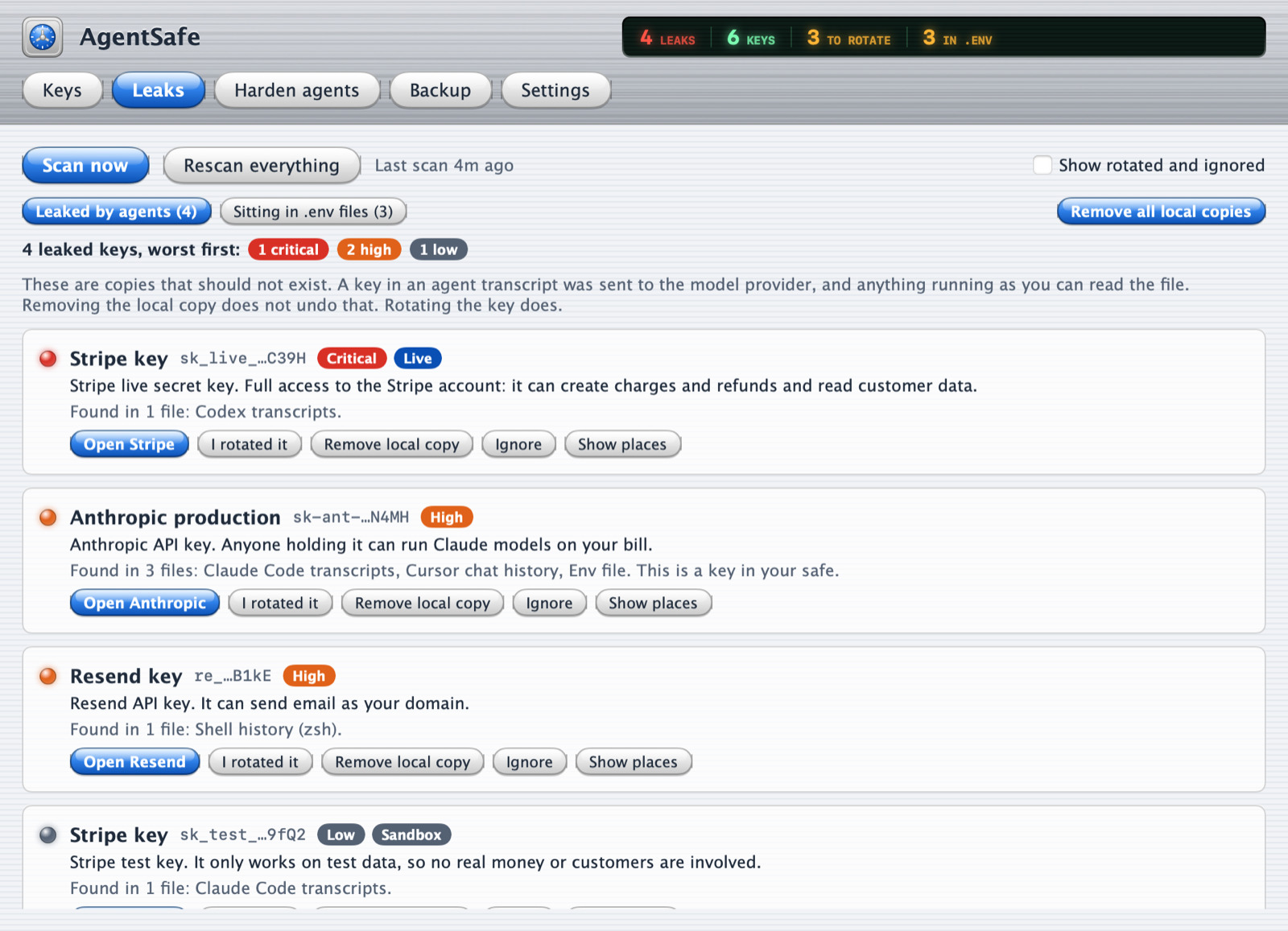
Every time an agent reads a key, or you paste one into a chat, it is written to a plain text file on your disk and kept for weeks. Anything running as you can read those files, and their contents were already sent to the model provider.
Where AgentSafe looks
- Claude Code, Codex and Cursor history
- The usual folders for Windsurf, Gemini CLI, OpenCode and Aider (less tested so far)
- Agent settings and MCP configs, including “don’t ask again” approvals
- Shell history
- .env files across your projects
What you get
A list of leaked keys with the file and line, a link to the provider’s page to replace each one, and a button to remove the local copy. Results are stored without the key itself: only the first and last few characters.
With a licence the watch runs all the time. The notch turns red within seconds of a key landing in a transcript.
Putting a key in takes a second. Getting one out takes your fingerprint.
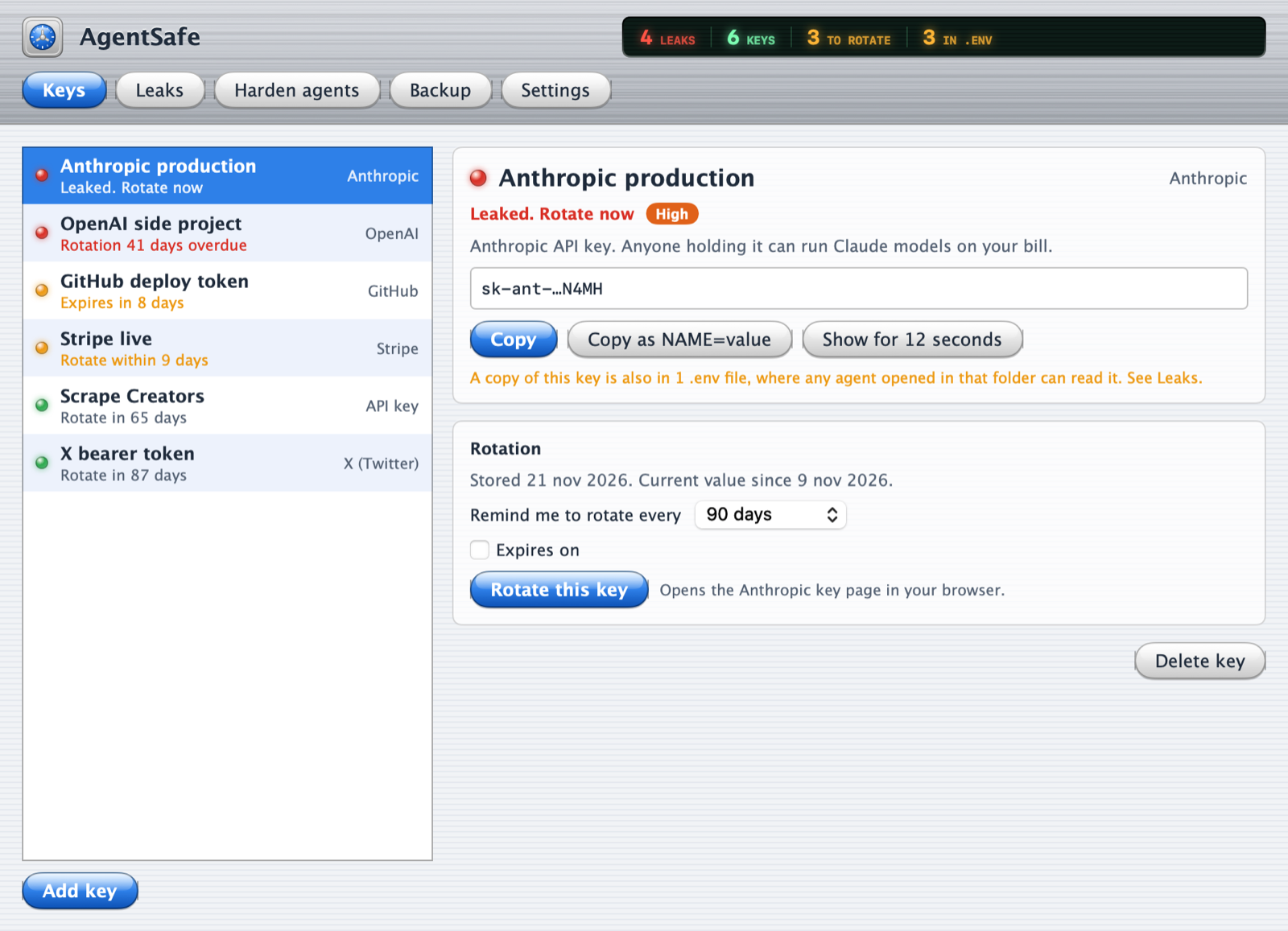
Copy a new key at the provider, paste it into the notch, done. AgentSafe recognises more than 25 key formats and names the key for you.
Saving needs no unlock, because each key is encrypted the moment it arrives. Reading one back needs Touch ID or your master password, every time. An agent can type and click. It cannot touch a sensor.
- Copied keys leave the clipboard after 30 seconds and are marked so clipboard managers skip them
- Each key shows its age, with a reminder when it is time to replace it
- Expiry dates, for keys that have one
- One encrypted backup file, since there is no cloud
- One click adds rules that stop Claude Code reading your .env files
It cannot phone home. macOS will not let it.
A tool that reads all your keys has to answer one question: where do they go? AgentSafe runs in the macOS sandbox with no network permission. That is enforced by the system, not by a promise, and you can check it yourself:
codesign -d --entitlements - /Applications/AgentSafe.app
You will see permission to read folders you choose, and nothing about the network. The price of that is honest too: the app cannot check for updates, so new versions are announced here.
What it does
- Keeps keys encrypted on disk, never in a plain file
- Asks for Touch ID before any key is copied or shown
- Finds keys that already leaked, and watches for new ones
- Stores findings without the secret in them
What it cannot do
- Undo a leak. A key that reached a transcript was sent to the provider. Only replacing it fixes that.
- Hide a key you choose to show on screen from an agent that can take screenshots. Copy instead.
- Stop a determined agent that has full access to your Mac. It removes the easy paths.
- Catch every secret. It knows key formats and .env names, not your passwords.
Pay once. The price goes up as people buy.
It starts at $0.99 and rises by $1 after every 5 sales until it reaches $5.99, where it stays.
- $0.99
- $1.99
- $2.99
- $3.99
- $4.99
- $5.99
Free
- Scan whenever you like, with full results
- Remove leaked copies, harden Claude Code
- Three keys in the safe
- Encrypted backup
Licence
- As many keys as you have
- The always-on watch, with alerts in the notch
- Rotation and expiry reminders
- Every later version
Before you download
My Mac has no notch. Does it work?
Yes. On a Mac or display without a notch, AgentSafe draws a small one at the top of the screen. There is also a menu bar icon.
Where are my keys stored?
In one encrypted file inside the app’s private folder on your Mac. The key that opens it is itself locked twice: once by your Mac’s Secure Enclave, which answers only after Touch ID, and once by your master password.
What if I forget my master password?
While Touch ID works, you can still use your keys. Without both, nobody can open the safe, including us. Keep a backup and write the password down somewhere offline.
Why does it ask to read my home folder?
Agent transcripts, shell history and .env files live there. macOS shows a folder dialog and the app can read only what you choose. It cannot send what it reads anywhere.
I already use a password manager. Why this?
Keep it for passwords. AgentSafe does two things most managers do not: it looks for keys that already escaped into agent files, and it never shows a pop-up for an agent to click.
How do I get updates?
The app has no network access, so it cannot fetch them. Download the new version here and drag it over the old one. Your safe stays where it is.